
.png)
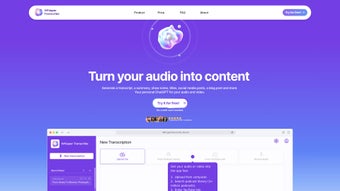
Description
Download WhisperTranscribe – AI‑Powered Transcription, Translation & Content Creation Tool
Overview
WhisperTranscribe is a cloud‑based, AI‑driven platform that turns any audio or video file into accurate, editable text and then extends that raw transcript into a full suite of ready‑to‑publish content. Built on top of the open‑source Whisper speech model, the service adds proprietary noise‑reduction layers, multilingual translation engines, and a set of writing assistants that can generate SEO‑optimized blog posts, social‑media captions, newsletters, and even video descriptions—all from a single upload. The core promise of WhisperTranscribe is to eliminate the repetitive, time‑consuming steps that creators traditionally face: manual transcription, copy‑and‑paste into a separate editor, and then hunting for the right tool to rewrite or translate the material. By consolidating these tasks into one secure environment, the platform lets podcasters, YouTubers, marketers, educators, and enterprise teams focus on strategy rather than transcription logistics. Accuracy is a key selling point; WhisperTranscribe reports a 95 % word‑error‑rate (WER) reduction in clean studio recordings and maintains above 90 % accuracy in moderately noisy environments. The service supports more than 55 languages for both transcription and translation, ensuring that creators can reach global audiences without hiring external translators. Security is baked in with end‑to‑end encryption, GDPR and CCPA compliance, and optional on‑premises deployment for highly regulated industries. Whether you need a quick set of subtitles for a webinar or a complete content pipeline that turns a two‑hour interview into a series of blog posts, a newsletter, and social‑media snippets, WhisperTranscribe delivers a fast, reliable, and scalable solution.
Key Features & Capabilities
- Automatic transcription in 55+ languages with up to 95 % accuracy.
- AI‑generated SEO‑optimized articles directly from transcripts.
- One‑click abstractive summaries for quick content overviews.
- Social‑media post generator with platform‑specific formatting.
- Quote extraction tool that highlights high‑engagement statements.
- Custom title, subject‑line, and newsletter drafting powered by AI.
- Seamless, lossless translation of transcripts into the same 55+ languages.
- Built‑in plagiarism checker to guarantee originality.
- Direct publishing integrations with WordPress, Medium, LinkedIn, Twitter, Facebook, Instagram, and Buffer.
- Secure cloud storage with AES‑256 encryption, GDPR/CCPA compliance, and optional private‑instance deployment.
Each of these features is engineered to streamline a specific stage of the content lifecycle. The transcription engine leverages Whisper’s deep‑learning backbone, augmented with proprietary acoustic models that filter out background chatter, echo, and wind noise, resulting in clearer text even from field recordings. Once the transcript is generated, the built‑in SEO assistant scans the document for high‑value keywords, suggests hierarchical headings, and drafts meta titles and descriptions that align with Google’s best practices. Summaries are produced using an abstractive transformer model that captures the core narrative while preserving nuance, making them ideal for executive briefings or quick social posts. The social‑media generator respects character limits for Twitter, includes relevant hashtags for Instagram, and formats content for LinkedIn’s professional tone, allowing you to schedule or export posts in seconds. Quote extraction automatically highlights sentences with high engagement potential, adding attribution metadata for easy citation. Translation mirrors the original transcription’s fidelity, delivering localized versions that retain the speaker’s tone and intent. All features are accessible through an intuitive dashboard that shows real‑time progress bars, version history, and collaborative editing tools, ensuring teams can work together without version conflicts. The result is a truly all‑in‑one content engine that removes the need for a patchwork of third‑party apps.
Installation, Setup & Compatibility
WhisperTranscribe is delivered primarily as a web‑application, which means you can start using it instantly from any modern browser without downloading heavy client software. To begin, visit whispertranscribe.com, click the “Get Started – Free” button, and register using an email address or Google OAuth. The onboarding wizard walks you through a quick email verification, then presents a clean upload interface where you can drag‑and‑drop MP3, MP4, WAV, or even live‑stream URLs. For users who prefer a native desktop experience, WhisperTranscribe offers optional Electron‑based wrappers for Windows 10/11, macOS 12+, and major Linux distributions (Ubuntu 20.04+, Fedora 33+). These wrappers sync automatically with your cloud account, so any changes made on the desktop are reflected instantly on the web portal and mobile apps.
Operating System Compatibility (itemprop="operatingSystem"): Windows 10/11, macOS 12 and newer, Linux (Ubuntu 20.04+, Fedora 33+), iOS 14 and newer, Android 9 and newer. Mobile apps provide full recording, editing, and publishing capabilities, allowing you to capture interviews on‑the‑go and push finished content directly to your chosen platform.
Installing the optional desktop client is straightforward: download the installer from the “Downloads” page, run the .exe (Windows) or .dmg (macOS), and follow the guided prompts. The installer automatically logs you in with your cloud credentials, ensuring a seamless handoff between devices. Enterprise customers can take advantage of Single Sign‑On (SSO) via SAML 2.0, role‑based access controls, and a Docker‑based private deployment that runs behind corporate firewalls. This flexibility makes WhisperTranscribe suitable for freelancers, small teams, and large organizations alike.
Pros & Cons
- Pros:
- High transcription accuracy across a broad language set.
- All‑in‑one workflow eliminates the need for multiple third‑party tools.
- Secure, GDPR‑compliant cloud storage with optional private‑instance deployment.
- Rich publishing integrations save time and reduce manual copy‑pasting.
- Generous free tier and scalable paid plans for teams of any size.
- Cons:
- Advanced features such as unlimited translations require a paid subscription.
- Processing very large video files can be slower during peak usage periods.
- The desktop client is optional; users who need a fully offline solution may find it limiting.
Conclusion & Frequently Asked Questions
WhisperTranscribe stands out as a comprehensive, AI‑driven solution that bridges the gap between raw audio and polished, publishable content. By handling transcription, translation, summarization, and content generation within a single, secure environment, it removes the friction of juggling multiple apps and dramatically cuts turnaround time. The generous free tier is sufficient for hobbyists and solo creators, while the tiered pricing plans scale gracefully for agencies, media houses, and enterprise teams that need collaborative editing, SSO, and private‑instance deployment. If your goal is to boost SEO, reach multilingual audiences, or simply reclaim hours lost to manual note‑taking, WhisperTranscribe offers a reliable, future‑proof toolset that delivers on its promises. Ready to transform your audio into engaging written material? Download WhisperTranscribe now, start your free trial, and experience the next generation of content creation.
Frequently Asked Questions
How accurate is WhisperTranscribe’s transcription in noisy environments?
The engine employs advanced noise‑cancellation algorithms that isolate speech from background sounds. In typical office or outdoor recordings, accuracy stays above 90 %, while clear studio audio reaches the advertised 95 %.
Can I use WhisperTranscribe offline?
The core service is cloud‑based, but the optional desktop client includes a limited offline mode for transcribing previously cached files. Full AI generation (blog posts, translations) still requires an internet connection.
Is there a limit on the number of languages I can translate to?
WhisperTranscribe supports translation into all 55 languages available for transcription. The free plan allows up to 10 translations per month, while paid tiers provide unlimited access.
How does WhisperTranscribe handle data privacy?
All uploads are encrypted with TLS 1.3 during transit and stored using AES‑256 encryption at rest. The platform complies with GDPR, CCPA, and offers data‑deletion requests within 24 hours.
What publishing platforms are directly integrated?
WhisperTranscribe integrates natively with WordPress, Medium, LinkedIn, Twitter, Facebook, Instagram, and Buffer for scheduled posts. An open API also allows custom integration with any CMS or marketing automation tool.
Guides & Tutorials for WhisperTranscribe
How to install WhisperTranscribe
- Click the Preview / Download button above.
- Once redirected, accept the terms and click Install.
- Wait for the WhisperTranscribe download to finish on your device.
How to use WhisperTranscribe
This software is primarily used for its core features described above. Open the app after installation to explore its capabilities.
User Reviews for WhisperTranscribe 0
No reviews found




